

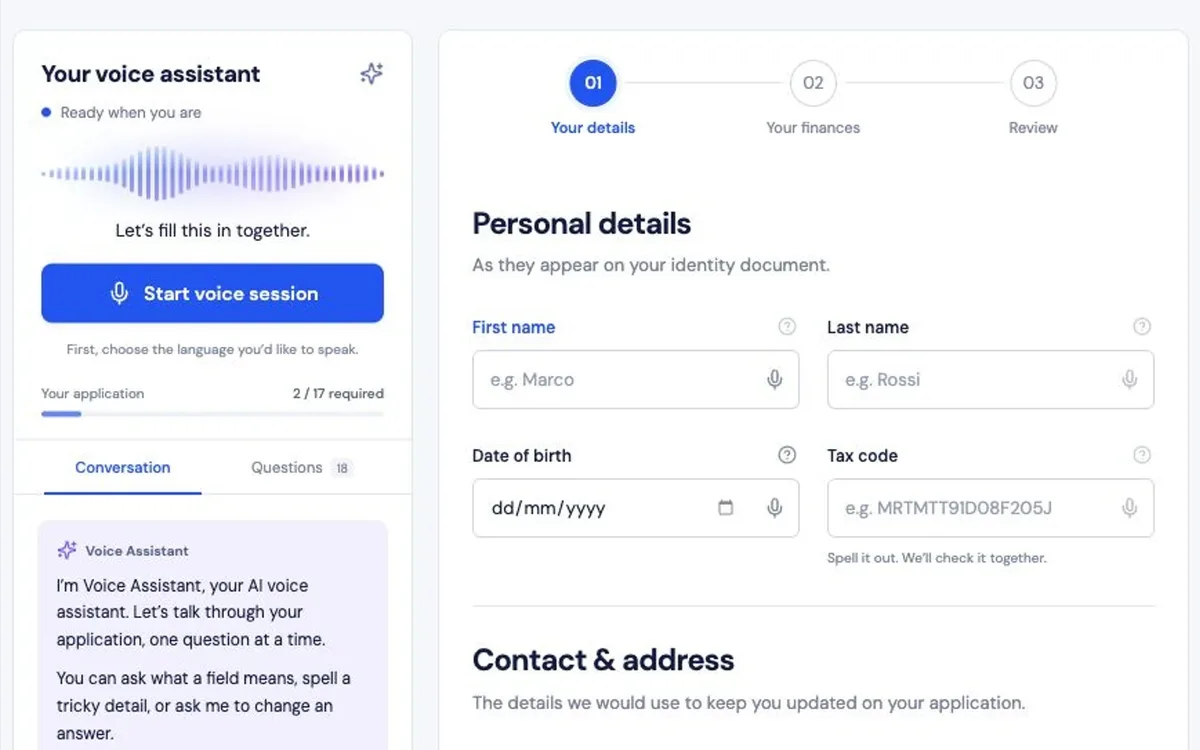

Choose your conversation language.
Start a voice session in English or Italian while keeping the editable form and current question visible.
Cross-industry
Work through a fictional application with a voice companion beside the form. Choose English or Italian, dictate and correct details, and review the completed example on screen.
Fictional data only; nothing is submitted. Voice mode uses your microphone and a speech provider.
React keeps the form fields, validation, and pending confirmations in step with the voice conversation. An Express server starts each voice session, and WebRTC carries the live audio. Dates, email addresses, phone numbers, and addresses need your explicit confirmation before they are saved.
Start a voice session in English or Italian while keeping the editable form and current question visible.

Review dictated suggestions, confirm important fields, revisit questions, or switch to manual editing.

Inspect the application details and illustrative financing calculation before acknowledging completion of the demo.

Media & Entertainment

Tells voice from sound effects in real time, using two AI models working together.
Try the demo
Cross-industry

Answers visitor questions from your own content with hybrid search, streamed in real time.
Try the demo
Marketing & Sales

Finds B2B accounts that match your ideal customer profile and backs each one with public sources.
Try the demo
Fintech & Banking

Gives employees cited answers on green leasing, e-mobility, and compliance.
Try the demo
Fintech & Banking

Helps customers choose a car lease: estimates payments, guides EV choices, and answers questions.
Try the demo
Fintech & Banking

Drafts customer emails for bank staff, with masked data, human review, and a full audit trail.
Try the demo
Fintech & Banking

Spots loans at risk of delinquency early and explains why, so teams can act in time.
Try the demo
Manufacturing

Spot a fault, find its likely cause, and test a fix on an interactive 3D model of the pump.
Try the demoShowing projects 1 to 3 of 8