

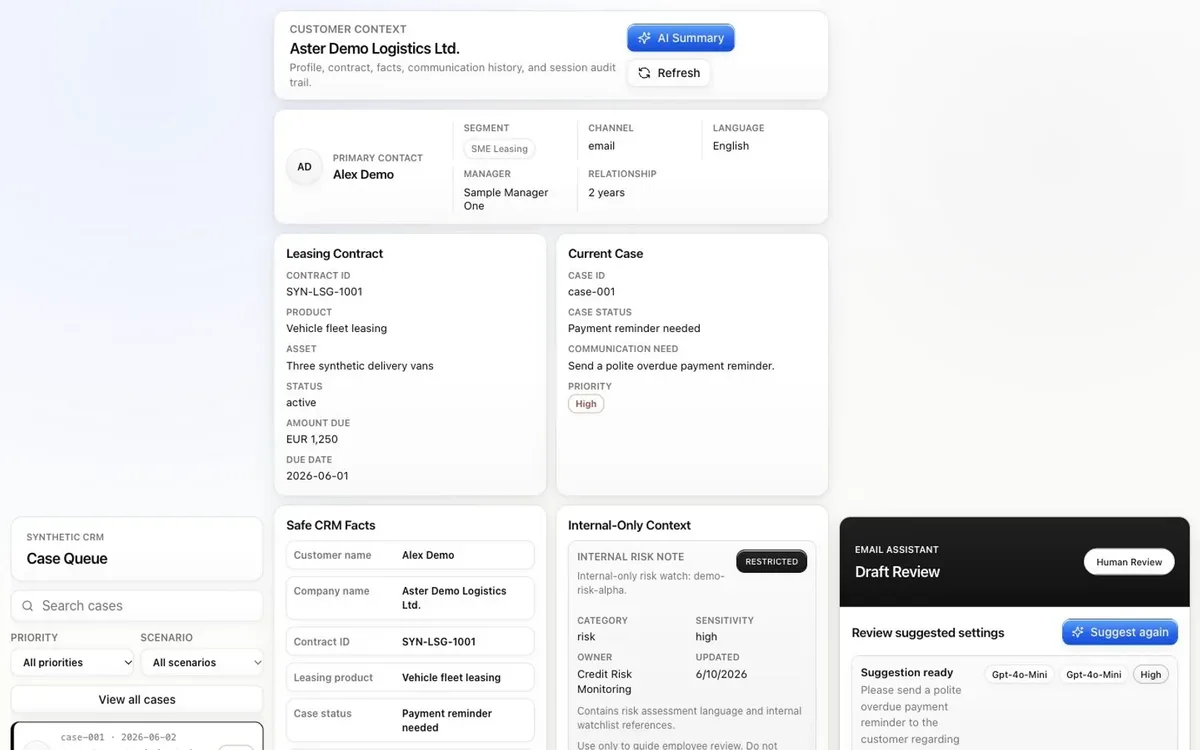

Review the case context.
Inspect customer and contract facts, safe context, internal notes, and communication history in one workspace.
Fintech & Banking
Open a synthetic leasing case, inspect its context, and prepare an email draft. Review the suggested settings and edit the message before confirming employee review.
Synthetic data only. Sensitive values are masked before AI use, and the demo sends no real emails.
An Express API on Node.js loads CRM records on the server. Before any AI call, each field is passed as is, masked with a placeholder, or blocked, so internal risk notes never reach the model or the customer text. The model suggests settings and writes a structured draft with the facts it used. If the model is unavailable, built-in templates keep the demo working.
Inspect customer and contract facts, safe context, internal notes, and communication history in one workspace.

Ask for scenario and tone suggestions, review the settings, and generate a customer-facing draft.

Revise the subject and message, then confirm employee review before copy and synthetic CRM logging become available.

Fintech & Banking

Helps customers choose a car lease: estimates payments, guides EV choices, and answers questions.
Try the demo
Fintech & Banking

Gives employees cited answers on green leasing, e-mobility, and compliance.
Try the demo
Fintech & Banking

Spots loans at risk of delinquency early and explains why, so teams can act in time.
Try the demo
Cross-industry

Answers visitor questions from your own content with hybrid search, streamed in real time.
Try the demo
Marketing & Sales

Finds B2B accounts that match your ideal customer profile and backs each one with public sources.
Try the demo
Media & Entertainment

Tells voice from sound effects in real time, using two AI models working together.
Try the demo
Cross-industry

Fills out forms by voice in English or Italian, and lets users confirm every change.
Try the demo
Manufacturing

Spot a fault, find its likely cause, and test a fix on an interactive 3D model of the pump.
Try the demoShowing projects 1 to 3 of 8