

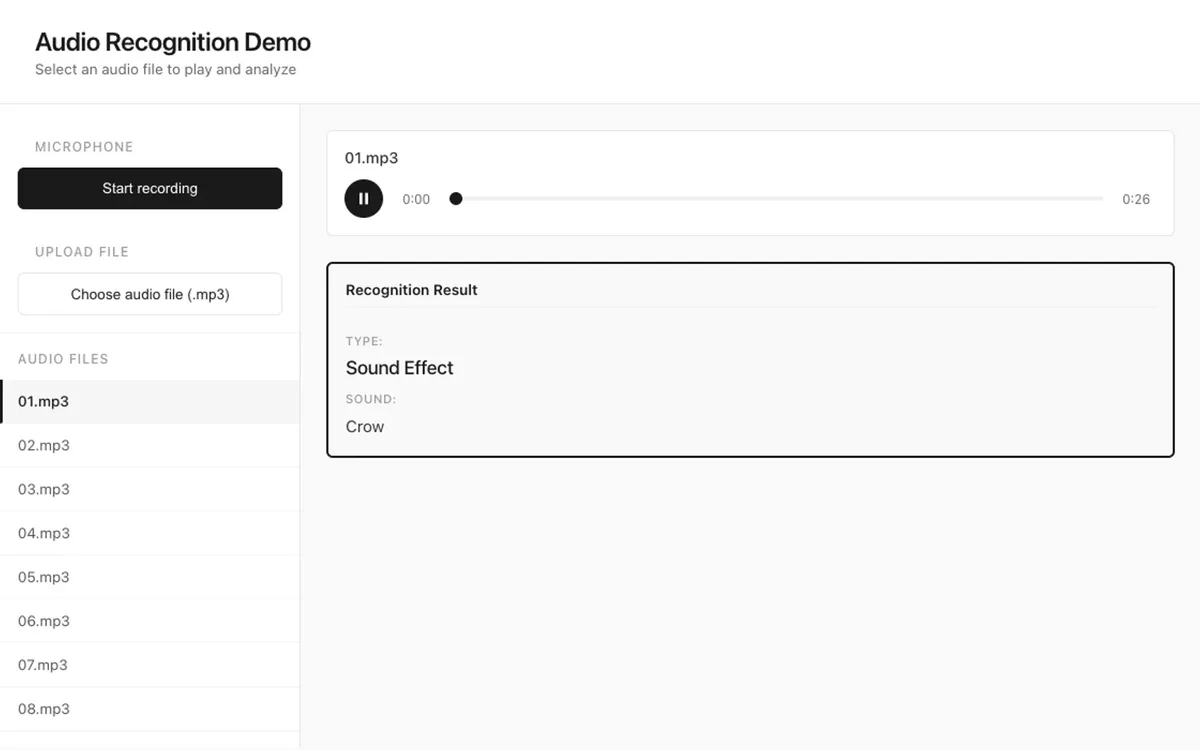

Pick, upload, or record.
Start from sample clips, upload an audio file up to 1 MB, or record up to two minutes with your microphone.
Media & Entertainment
Upload a file, record your voice, or pick a sample clip and find out whether it is speech or a sound effect. Two AI models analyze each clip at once, and the more confident result wins.
Upload an audio file up to 1 MB or record up to 2 minutes. The demo runs on a test server, so analysis may be slower than in production.
A Next.js and React interface sends audio to a FastAPI service. Two models run in parallel: OpenAI Whisper transcribes speech and gives a confidence score, and an AudioSet classifier names the most likely sounds. A confidence rule then picks the final result: speech with its transcript, or a sound effect with its label.
Start from sample clips, upload an audio file up to 1 MB, or record up to two minutes with your microphone.

Whisper listens for speech while a sound classifier listens for everything else. Both run at once, so the wait depends only on the slower one.

The player labels each clip as speech or a sound effect and shows the transcript or the top sound label.

Cross-industry

Fills out forms by voice in English or Italian, and lets users confirm every change.
Try the demo
Cross-industry

Answers visitor questions from your own content with hybrid search, streamed in real time.
Try the demo
Marketing & Sales

Finds B2B accounts that match your ideal customer profile and backs each one with public sources.
Try the demo
Fintech & Banking

Gives employees cited answers on green leasing, e-mobility, and compliance.
Try the demo
Fintech & Banking

Helps customers choose a car lease: estimates payments, guides EV choices, and answers questions.
Try the demo
Fintech & Banking

Drafts customer emails for bank staff, with masked data, human review, and a full audit trail.
Try the demo
Fintech & Banking

Spots loans at risk of delinquency early and explains why, so teams can act in time.
Try the demo
Manufacturing

Spot a fault, find its likely cause, and test a fix on an interactive 3D model of the pump.
Try the demoShowing projects 1 to 3 of 8